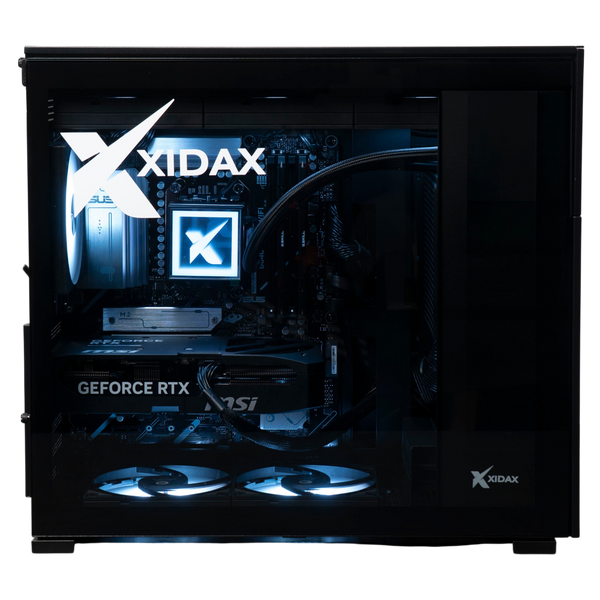
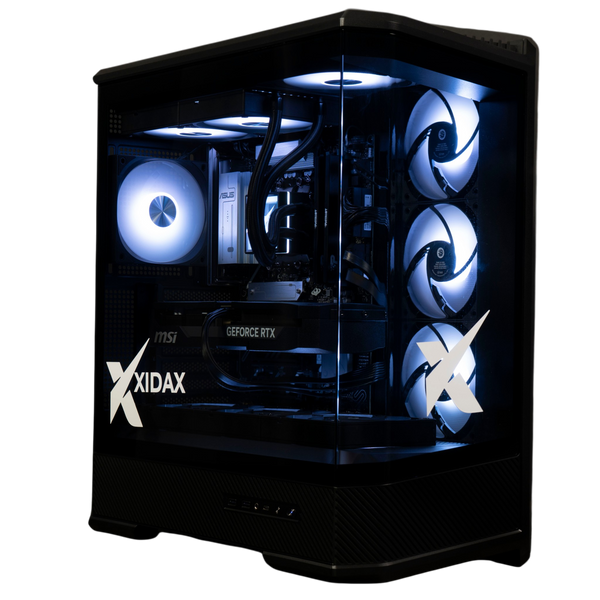
If you’ve ever noticed your gaming computer slowing down during an intense gaming session, your system might be fighting an invisible enemy: heat.
When your GPU and CPU load get too hot, they start thermal throttling—a safety feature that reduces performance to prevent damage. The result? Lower FPS, stuttering, and a frustrating gaming experience.
But here’s the good news: proper airflow in your PC can keep temps in check and performance high.
Upgrade to an airflow-optimized Xidax build today and say goodbye to stutters, lag, and performance drops.
- Mesh-front cases for maximum cooling
- Strategic fan layouts tested for peak airflow
- Lifetime support from Utah-based experts
Build Your High-FPS, Low-Temp PC Now - Chat with Our Gaming PC Specialists
(By the way - this article deals specifically with desktops - if you need laptop advice, check out our other blog on gaming laptop performance hacks.)
CPU Thermal Throttling: The Basics of Thermal Management
Thermal throttling is your CPU or GPU’s way of saying, “I’m too hot—time to slow down!” Higher clock speed (basically how quickly your cpu can cycle through tasks) can cause heat to hit a dangerous level. At around 90–100°C for most processors, your PC will lower clock speeds to cool off. This means:
-
Lower FPS in games
-
Stuttering or lag during demanding tasks
-
Longer load times if your system is struggling
Temperature and Clock Speed
Heat output from your CPU will also be determined by it's clock speed. Overclocking pushes the CPU to it's limits, which means excessive heat, and - without proper cooling - performance loss. Whether you decide to overclock or not, there are general guidelines to help prevent throttling in your gaming PC.
For an optimal gaming computer: Check into base and boost clocks, keeping your cooling system in mind.
- Aim for a CPU performance clock speed between 3.5 GHz and 4.0 GHz
- Speeds exceeding 4.0 GHz can enhance better performance for demanding applications, but this requires more cooling power.
- Speeds within the 3.5 GHz to 4.0 GHz range strike a balance - smooth gameplay while managing resource-intensive tasks
- CPU performance at 3.5 GHz paired with a minimum of 16 GB of RAM serves as a solid foundation for CPU-intensive gaming.
Check if your CPU is Thermal Throttling
If you suspect that your PC is throttling, your first sign will likely be noise. The fans in your cooling system will speed up, or even whine, indicating that they are working hard to keep your system cool. To double check your thermal stats:
-
Monitor temps with software like HWMonitor, Core Temp, or MSI Afterburner.
-
Watch for sudden performance drops — throttling occurs when heat builds over time. If your game runs smoothly at first but slows down after 30+ minutes, additional heat might be the issue.
-
Thermal management: Listen to your fans — if they’re constantly running at max speed, your computer is working overtime to stay cool.
Most importantly, don't wait for issues during gaming to make changes: design your cooling setup to prevent long-term hardware damage.
Why PC Case with Good Airflow Is a Game-Changer
A great gaming PC isn’t just about getting the most powerful CPU and GPU—your PC case design plays a huge role in keeping those parts cool, so you can use them to their full potential. Here’s how:
1. Fans: Intake vs. Exhaust
-
Intake fans pull cool air into the computer tower (usually at the front or bottom).
-
Exhaust fans push hot air out (usually at the top or rear).
-
A balanced setup ensures fresh air flows over your components before exiting.
TIP: Coolers attached to your hardware also matter: whether you have a fan-powered air cooler for your CPU or a double loop liquid cooling setup, your build has some way of directly pulling heat off of your CPU and GPU as they work hard. These systems need to work in concert with your intake and exhaust fans, for maximum cooling power.
2. Chassis Design Matters: Prevent Thermal Throttling
Some PC cases look sleek but choke air with solid front panels or poor ventilation. Look for cooling options:
-
Mesh front panels (better than glass or solid metal)
-
Room for multiple fans (and/or liquid cooling)
-
Spacious interiors to avoid cramped heat buildup
TIP: Cable management matters too! An organized build allows air to flow seamlessly, but a mess of cables around your hardware can cause overheating. Keep your build's cables neat and tucked away to prevent heat from building in your case.
3. Dust Management
Even the perfect cooling setup is useless if you let your build sit around for years and gather dust. Buildup prevents heat from escaping, and it also just looks bad, too.
Check if fans and vents are clogged with dust - this causes heat to build up in your case. Towers with dust filters (like Xidax’s airflow-optimized designs) help keep your system clean and cool for years, but you still need to clean those at least twice a year.
TIP: Don't smoke or vape by your PC, either. It just helps dust and grime build up, and makes dust filters sticky (gross, dude).
4. Fix Your Frame Rates (FPS)
All this cooling should be giving you a better gaming experience - but what does that really looks like?
Ideally, you want a minimum of 60 FPS (Frames Per Second), though this can vary based on the game and individual preferences. Lower FPS can mean choppy or lagging gameplay, while a higher average FPS provides a more fluid and responsive experience.
Don't know your current FPS limits? Try stress testing your system to find out what it can handle. OCBASE is a pretty good software for this, and they offer free downloads for personal use.
General FPS guidelines:
- 30-45 FPS: Playable, but may be noticeable in fast-paced PvP games.
- 45-60 FPS: Smooth, but not necessarily ultra-smooth.
- 60 FPS: Generally regarded as the sweet spot for most gamers, balancing smoothness and graphics quality.
- 60-90 FPS: Very smooth, often the target for many gamers when setting up their hardware.
- 90-144 FPS: Exceptionally smooth, indicating a consistent and stable FPS.
- 144+ FPS: Extreme smoothness, typically advantageous for competitive players or those with high-refresh-rate monitors.
If you're not hitting your ideal targets with FPS, thermal bottlenecks can be one cause. Check your temperatures, and take a deeper look at how hard your rig is working. Need additional help? Just give us a call or sent us a chat on our website, and we can talk through the problem with you.
How Ventilation Impacts FPS
To prove just how much the PC Case design affects performance, take a look at the build we created for one of our Xidax Players, MOXSY:
Even on all ultra max settings, performance was at 239 FPS, and the game looks incredible. We love that feeling when you get to see a game the way a developer intended, with no lag or stuttering taking you out of the flow.
Don’t Let Heat Kill Your FPS: How to Optimize Your Gaming PC’s Cooling
A well-designed pc case with great airflow can make all the difference in your gaming experience. Whether you’re upgrading your current build or planning a new one, cooling should never be an afterthought.
Avoid thermal issues and keep FPS high. We recommend these cooling methods:
1. Choose the Right PC Case
The right case ensures the hardware you invest in won't underperform or overheat. Start by evaluating your tower size and ventilation design. A case with good circulation of air typically features multiple fans mounting points and a layout that promotes unobstructed air paths from intake to exhaust.
Xidax offers high-airflow cases designed for maximum cooling, no matter how powerful your build. Here are just a couple examples.
XEN Case (Black or White Colorways)
This case comes standard for our X2 and X6 Gaming PC builds. Here are the specs:
| Feature | Specification |
| Case Type | Mid‑tower steel |
| Dimensions | 8.07″ × 15.4″ × 17.32″ / 16.02″ H w/ feet |
| Volume | ~35.4 liters |
| Weight | 14.94 lb |
| Drive Bays | 3× 2.5″ + 2× 3.5″ |
| Motherboard Support | ATX / micro‑ATX |
| PCI Slots | 7 |
| PSU Support | Standard ATX |
| CPU Cooler Clearance | Up to 168 mm |
| GPU Clearance | 330–400 mm |
| Fan Support | Top 3×120/2×140, Rear 1×120, Bottom 3×120/2×140, Front 1×120 |
| Radiator Support | Top 240/280/360, Rear 120, Bottom 240/360 |
| Front I/O | USB‑C 3.2 Gen 2, USB‑A 3.0, audio jack |
| Optional LCD Panel | 8″ 1280×800 TFT‑LCD via Mini‑HDMI + USB‑C, 300 cd/m² brightness |
Tetradon Black Case
This case comes standard with our X8 Gaming Desktop Model:
| Feature | Specification |
| Size (D × W × H) | 522 × 304 × 531.9 mm |
| Materials | Steel + 4 mm tempered glass + aluminum |
| Motherboard Support | E‑ATX (≤ 280 mm), ATX, mATX, mITX |
| PCI Slots | 8 |
| Storage Bays | 3× 2.5″ (tray) + 4× 3.5″ / 2.5″ (cage) |
| GPU Clearance | Up to 460 mm |
| CPU Cooler Clearance | Up to 167 mm |
| PSU Compatibility | ATX (≤ 220 mm depth) |
| Fan Support | Top/Side/Bottom: 3×120/3×140; Rear: 2×120 |
| Radiator Support | 240/280/360/420 mm all orientations |
| Front I/O | Power/Reset, 4× USB3.0, USB‑C, Audio, LED controls |
| Dust Filters | Top, bottom, and 2 on the side |
2. Setup Your Fans to Prevent Overheating
-
At least 2 intake + 1 exhaust fan for balanced air between cooling and heat generation. We offer a minimum of 6 fans in our custom builds, so you can level this up.
-
Liquid cooling for overclocked or high-end builds.
3. Check if Your Gaming PC is Clean and Maintained
-
Clean dust filters every 3 months. Build up will mean faster overheating and poor performance. Invest in some compressed air, and blast them outdoors to prevent dust from coming back.
-
Don’t forget about passive cooling solutions, either. Heat sinks and thermal pads can help dissipate heat from critical components. Applying high-quality thermal paste can also enhance heat transfer between your CPU/GPU and their coolers, further optimizing thermal performance.
- Reapply thermal paste every 2 years for best CPU cooling.
4. Components and Climate
When selecting components, it’s important to consider not only the heat output of your CPU and GPU in your gaming pc, but also the temperature of the space your pc will be in.
If you live in a hot area, temperatures will rise on your desktops more easily, leading to thermal throttling that affects the performance and longevity of your hardware. You may need to adjust your cooling strategy accordingly.
5. Get Expert Advice (Xidax’s Specialty!)
Not sure what your gaming computer needs? Our Utah-based experts can help you pick the perfect cooling setup—no guesswork required. You can also checkout our pc building blog.
Investing in appropriate cooling solutions not only enhances your system's performance but also prolongs its lifespan. By prioritizing cooling in your build, you can enjoy stable and efficient performance, whether you’re gaming, rendering, or multitasking. Remember, a cool system is a happy system.
At Xidax, we configure gaming PCs optimized for airflow and long-term performance, backed by lifetime support from real experts. Ready to boost your FPS and keep your system running smoothly for years? Check out Xidax’s airflow-optimized cases and builds today!
Got questions? Our Utah-based team is here to help! Drop us a line or customize your dream gaming PC with cooling that lasts.